
Google AI Search Redesign: Sidebar, Gemini Tools and More
Google AI search redesign adds Gemini shortcuts and chat history while removing the Search button. See what changes - and what stays the same.
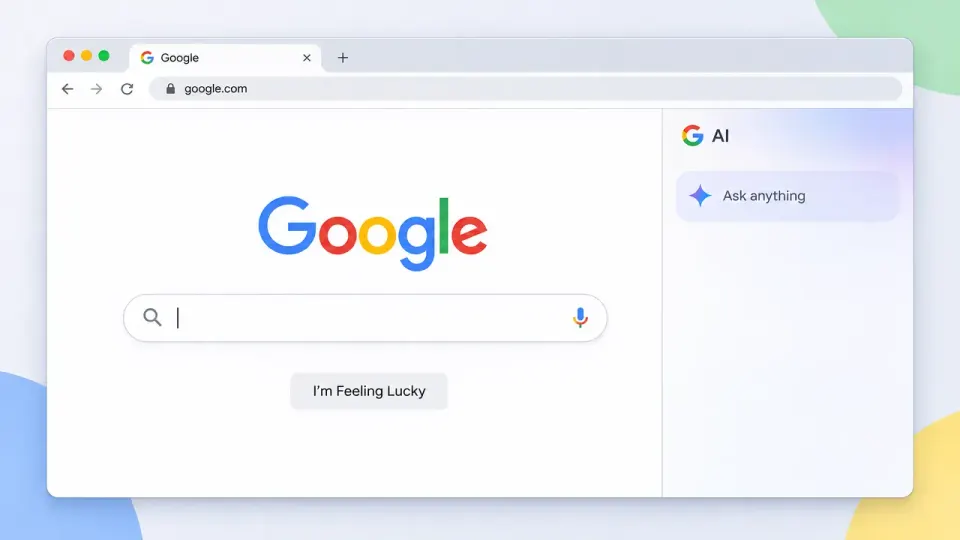
Table of Contents
Quick Answer
Google's desktop Search homepage redesign adds Gemini-powered shortcuts for image generation, file analysis, and brainstorming, plus a sidebar for AI chat history. It removes the dedicated Google Search button but keeps the search field and “I'm Feeling Lucky,” and does not confirm that conventional search results are being replaced.
The change is to the homepage interface. It brings AI options closer to the point where people start a search, but does not, by itself, confirm that Google has replaced conventional search with AI.
What’s changing on the Google Search homepage
The search box remains the main feature, but the redesigned page places Gemini-connected options beneath it. Users can choose tools for image generation, file analysis or brainstorming instead of starting with a standard text query. These shortcuts make it easier to begin a specific AI task directly from Search’s homepage.
A new AI sidebar provides access to chat history. Users can open the sidebar from the homepage to return to earlier AI conversations, rather than treating each visit as a completely new interaction. That addition makes the page a more visible entry point to Gemini and its ongoing chats, as well as to standard Google searches.
The reported changes are focused on the desktop homepage. The rollout is underway after several weeks of testing, so the updated design may not appear for every account at the same time.
The Search button is gone, but “I’m Feeling Lucky” stays
The redesign removes the dedicated “Google Search” button below the search field. The “I’m Feeling Lucky” button remains. Users can still enter a query in the search box and submit it, so the missing button changes the page’s controls, not the basic act of searching.
That distinction matters for anyone concerned that the homepage is becoming an AI-only destination. The search field is still present, and the reported redesign does not say that ordinary web results have been removed. Instead, Google is placing Gemini actions and search in the same starting area.
Some users may find the old button reassuring or simply prefer a homepage with fewer AI prompts. Others may value having image generation, file analysis and brainstorming immediately available. Those are reactions to the interface; the redesign alone does not establish how users will respond or whether their search habits will change.
What the redesign signals - and what it doesn’t confirm
The Google AI search redesign signals a more prominent role for Gemini on Google’s desktop homepage. The AI shortcuts and chat-history sidebar give users more direct ways to start or resume an AI interaction without first navigating elsewhere.
But a redesigned entry point should not be confused with a confirmed overhaul of Search itself. The available details describe homepage controls and access to AI tools. They do not establish that every query will be answered by Gemini, that traditional search results are going away, or that the same interface is available on every device.
Check your Google Search homepage to see whether the redesign has reached your account. For more context, explore our Google Gemini guide, our explanation of AI Overviews, and our guide to using Google Search.
Frequently Asked Questions
What is changing in Google's AI Search redesign?
Did Google remove the Search button from its homepage?
Does the Google Search redesign mean AI is replacing regular search?
When will the new Google Search homepage appear for everyone?
Key Takeaways
- The redesign adds Gemini-connected options beneath the desktop Search field for image generation, file analysis, and brainstorming.
- A new sidebar gives users access to their AI chat history from the homepage.
- Google removes the dedicated “Google Search” button but keeps the search field and “I'm Feeling Lucky.”
- The reported changes concern the homepage interface and do not confirm that Google is replacing conventional search results with AI.
- Google tested the design for several weeks before beginning a gradual rollout, so it may not appear for every account at once.