
Robot Red Teaming: Test AI Robots Safely in Simulation
Learn how robot red teaming uncovers AI robot failures in simulation, with a practical workflow for safer, evidence-based real-world validation.
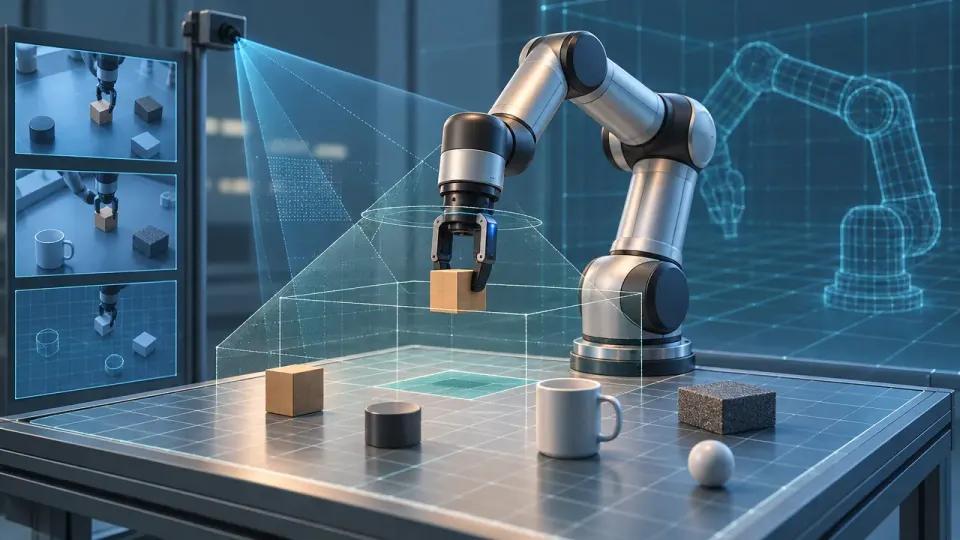
Table of Contents
Quick Answer
Robot red teaming in simulation means deliberately testing an AI robot under varied and challenging conditions to find failures before real-world use. Define measurable success and failure criteria, record repeatable test results, and validate important findings through controlled physical testing.
The goal is to uncover weaknesses, document them, and turn them into tests for later validation. A useful workflow has five parts: define the task, build a representative virtual environment, probe challenging conditions, record failures, and carry the findings into controlled physical testing.
What simulation-based robot red teaming can - and cannot - prove
Simulation can help teams examine how an AI robot responds to changes in objects, positions, timing, and other task conditions. It can also make it easier to repeat a scenario consistently and inspect how a robot reached an outcome. This is valuable for work requiring precise movements or coordinated handling, such as inserting a component or picking up an object with a specific grip.
Red teaming is different from using simulation only to train a robot to complete a task. Training asks, “Can the system learn this behavior?” Red teaming asks, “Under what conditions does the behavior break, become unreliable, or create a hazard?” Teams can use the same simulator for both, but should keep the test goals distinct. Otherwise, a robot may appear robust simply because it has repeatedly practiced a narrow set of scenarios.
Simulation results depend on the virtual environment and its assumptions. If an object’s weight, friction, camera view, or robot movement differs from reality, a simulated success may not transfer. Treat simulation as a way to find risks and prioritize experiments - not as a substitute for deployment safety checks.
Define the task and baseline before probing for failures
For example, a robot tasked with placing a small part into a fixture might need to identify the part, grasp it, align it, insert it, and confirm placement. The process should also say what happens if the part is missing, obstructed, or misidentified. That makes it possible to test more than the ideal, uninterrupted sequence.
Run a baseline using the normal task setup before introducing challenges. Record the success rate and relevant measures over repeated runs, not just one demonstration. This gives the team a comparison point: after changing the environment, it can tell whether performance has degraded and by how much.
Build a virtual environment that reflects the real task
Model the operating area too. Include nearby surfaces, obstacles, and relevant constraints on the robot’s movement. If the real task uses a camera, reflect its position and field of view; if the robot relies on other sensors, represent their limitations where possible. A scene that looks convincing but omits a task-critical constraint can produce misleading results.
Keep track of what is modeled and what is simplified. That record helps reviewers interpret a result: a failure in a well-represented contact scenario may deserve a different response from a failure involving a sensor effect that the simulator does not capture.
Stress-test precision, dexterity, and task variation
For precision work, examine how small alignment differences affect the outcome. For dexterous tasks, look at whether the robot maintains control through a sequence of movements, not only whether it completes the final action. Also test interruptions or uncertainty where relevant, such as a temporarily blocked view or an object that is not where the robot expects it to be.
Avoid changing many parameters at once at the start. Isolating variables makes it easier to understand why a robot failed. After individual sensitivities are mapped, combine conditions to see whether several modest changes produce a larger problem.
Repeat important scenarios. A single successful run does not show that a robot can handle a condition reliably, and a single failure may be difficult to reproduce. Repetition can reveal inconsistent behavior and help teams prioritize issues by severity, frequency, and the consequences of failure.
Turn simulation failures into a deployment test plan
Use the failure log to decide what needs further work. A repeated alignment error may call for changes to perception or control. A failure to stop when the target is unclear may require a safer fallback behavior. If the test depends on details the simulation does not model well, note that limitation and design a physical test to investigate it.
A simulator can help teams explore scenarios and assess behavior, but robot flexibility and the quantity and variety of training data remain practical challenges. No test suite can cover every real-world condition. Before deployment, document the unresolved failures and the limits of the evidence, then decide whether each risk needs more testing, mitigation, or a restricted operating scope.
Before deploying a robot, use this workflow to document its task, simulated stress tests, and unresolved failures - then carry those findings into controlled real-world validation.
Step-by-Step Guide
Define the task and operating context
Document the robot's intended task, work area, nearby people or machines, expected action sequence, start and end conditions, and required limits or fallback behaviors.
Set measurable criteria and run a baseline
Specify observable success and failure conditions, such as placement accuracy, completion time, dropped objects, collisions, or stopping when perception is uncertain. Run repeated trials in the normal setup and record the results for comparison.
Build a representative virtual environment
Model task-critical robot limits, objects, contact properties, fixtures, surfaces, obstacles, and sensor views. Record assumptions and simplifications, and compare modeled details with real setup measurements where available.
Probe challenging conditions
Change one plausible task condition at a time, such as object position, orientation, obstruction, or sensor visibility. After identifying individual sensitivities, combine variations to check for interacting risks.
Log failures and carry findings into physical tests
Record scenario settings, outcomes, action traces, and sensor inputs where available. Prioritize issues by severity and repeatability, then use controlled, safeguarded physical tests to investigate simulation findings and sim-to-real differences.
Key Statistics
- The article's proposed workflow has five parts: define the task, build a virtual environment, probe challenging conditions, record failures, and carry findings into physical testing.This is the article's process framework, not an industry-wide benchmark or a claim about measured outcomes.
- The article gives an illustrative example of 18 successful simulated insertions out of 20 trials under a small part-offset condition.The 18-of-20 figure is presented as a sample way to report a result, not as a real experiment, benchmark, or prediction of physical performance.
Frequently Asked Questions
What is robot red teaming?
Why test AI robots in simulation before deployment?
How do you red-team a robot in simulation?
What should teams measure during robot simulation tests?
Does passing simulation tests prove a robot is safe to deploy?
Key Takeaways
- Use simulation to discover and prioritize risks, not as proof that a robot is ready for deployment.
- Define the robot's task, operating context, measurable success criteria, and failure conditions before testing.
- Represent task-critical physics, objects, sensors, and constraints in the virtual environment, and document what the model simplifies.
- Test individual variations first, then combine them; record failures, near misses, hesitation, and unexpected behavior across repeated runs.
- Turn simulation findings into a staged physical test plan, and document unresolved risks and limits of the evidence.