
OpenAI Dot vs Meta Muse: AI Agent Comparison Guide
OpenAI Dot vs Meta Muse explained: compare availability, integrations, privacy, safety controls, and what remains unconfirmed before choosing an AI agent.
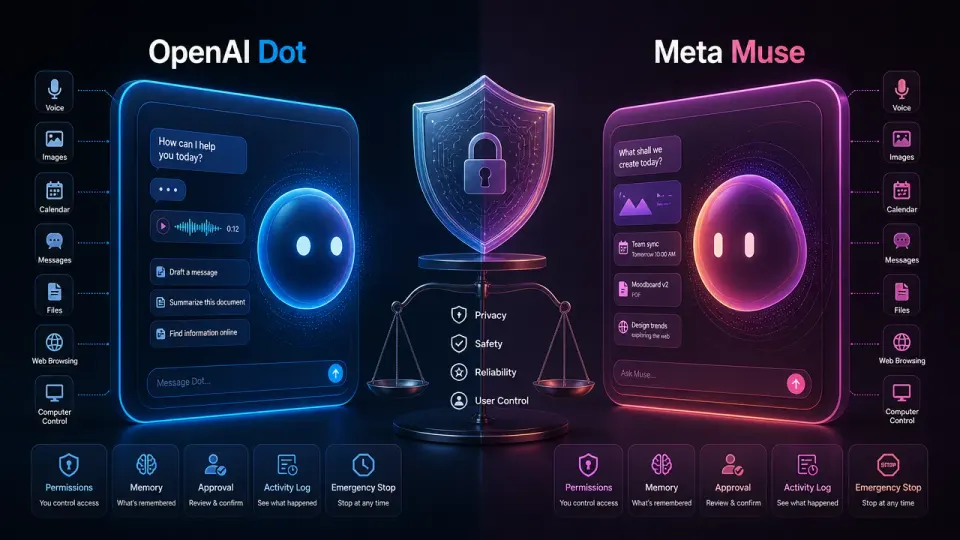
Table of Contents
Quick Answer
OpenAI Dot and Meta Muse are announced AI-agent products, but available evidence does not yet establish a reliable performance or value winner. Compare their confirmed availability, integrations, privacy practices, approval controls, activity logs, and ability to pause or undo actions before choosing one.
That makes the right comparison less about declaring an instant winner and more about separating confirmed information from assumptions. Here is what prospective users should examine before choosing between them.
What OpenAI Dot and Meta Muse are - and what is confirmed
OpenAI Dot and Meta Muse are being positioned as AI assistants that can do more than answer prompts. The broader agent model involves interpreting a request, using connected tools or services, and completing a task with less step-by-step direction from the user.
The confirmed development status matters: these are announced products, not merely invented names or unsupported rumors. However, an announcement does not establish that every proposed capability is ready for public use. A product can be demonstrated internally, offered to a limited group, or still change substantially before launch.
At the time of comparison, the most important unresolved questions are:
- When each agent will be broadly available
- Whether access will require a paid plan or a particular device
- Which operating systems and services each one supports
- Whether actions happen in the cloud, on the device, or through a hybrid system
- What users can review, approve, interrupt, or undo
Those gaps are especially important for agentic AI. A chatbot mainly produces information. An agent may send a message, modify a file, book an appointment, or use an account on the user's behalf.
OpenAI Dot Features
OpenAI Dot's central appeal is likely to be its connection to OpenAI's assistant ecosystem and the company's experience with multimodal models and tool use. In practical terms, users will want to know whether Dot can interpret text, images, audio, and files, then take action across approved services.
Those capabilities should not be treated as confirmed unless they appear in OpenAI's product documentation or a public demonstration. The same applies to claims about memory, personalization, autonomous task completion, and third-party integrations.
For Dot, the useful evaluation questions are concrete:
A strong Dot experience would combine capable reasoning with clear boundaries. For example, it might draft a travel itinerary automatically but require confirmation before purchasing a ticket. That distinction is more meaningful than a marketing claim that the agent is “autonomous.”
Meta Muse Features
Meta Muse is likewise best assessed through its practical controls rather than its name or brand positioning. Users need to know whether Muse is designed primarily for conversation, device assistance, connected services, or broader computer and web tasks.
Its eventual advantage could depend on the products and accounts it can reach. An agent integrated deeply with a user's communications, media, or social tools may be convenient, but that convenience also increases the consequences of an error. Sending the wrong message or exposing private information is very different from producing an inaccurate answer in a chat window.
Before treating Muse as a full personal agent, check whether public documentation confirms:
- Multimodal input such as voice, images, and screen context
- Access to calendars, messages, files, or other services
- Persistent personalization and user-editable memory
- Automated browsing or computer control
- Confirmation prompts for purchases, messages, and account changes
At present, the available evidence does not establish a reliable feature-by-feature performance advantage for Muse over Dot, or vice versa. A demonstration can show that an agent completes one task; it does not prove consistent performance across unfamiliar websites, ambiguous instructions, or interrupted sessions.
Personalization, integrations, and user control
Personalization is likely to be one of the biggest differences between the two products, but it is also one of the easiest features to misunderstand. Remembering a preferred writing style is relatively low risk. Remembering health information, financial details, or private conversations requires stronger controls.
Compare the products on whether they offer:
- A visible list of connected accounts and permissions
- Separate controls for memory and activity history
- Per-task approval settings
- An activity log showing completed and attempted actions
- A clear way to revoke access
- An emergency stop that ends active tasks
The quality of these controls may matter more than a small difference in benchmark scores. An agent that is slightly slower but easy to inspect and interrupt may be preferable to a faster agent that acts opaquely.
Availability, pricing, platforms, and account requirements
Neither product should be chosen on assumed availability. The relevant information must come from current OpenAI and Meta documentation, including the supported countries, account tiers, device requirements, and limits on agent actions.
Pay particular attention to whether access is:
- Open to everyone or limited to an invitation or test group
- Included in an existing subscription or charged separately
- Available on the web, mobile devices, desktops, or dedicated hardware
- Restricted to a company's own services
- Subject to usage caps or slower performance at busy times
A low advertised price may not represent the total cost if an agent requires a premium account, compatible hardware, or paid third-party services.
Privacy and data handling: cloud-based or local processing?
The local-versus-cloud question is central to this comparison. Local processing can reduce the amount of sensitive data sent to a provider and may allow an assistant to work without a continuous internet connection. Cloud processing can support larger models and more capable tools, but it requires users to trust the provider's storage, retention, and security practices.
Do not assume either Dot or Muse is fully local simply because it runs on a personal device. Many assistants use a hybrid design: some detection happens locally, while complex reasoning or external actions are handled in the cloud.
Before connecting personal accounts, review what each service collects, how long it retains prompts and activity logs, whether conversations are used for model improvement, and how deletion works. Treat access to email, files, contacts, and payment services as separate privacy decisions rather than a single acceptance screen.
Reliability and safety: transparency, monitoring, and emergency stops
Agent safety is not only about refusing harmful prompts. It is also about preventing ordinary mistakes. An agent can misread a request, follow malicious instructions on a webpage, use the wrong account, or continue acting after the user's goal has changed.
Both Dot and Muse should therefore be tested on reversible tasks first. Ask an agent to summarize a document, create a draft, or organize a list before granting permission to send, purchase, delete, or publish. Watch whether it explains its plan, reports uncertainty, and stops when a permission is missing.
The strongest product will make its behavior observable. Users should be able to see what the agent is doing, which data it accessed, and why it took an action. A prominent stop button and confirmation step are not inconveniences; they are essential controls for systems that can affect the real world.
Which AI agent is better for different users?
There is no evidence-based overall winner yet. Dot may suit users already invested in OpenAI's tools if its final integrations and controls match that ecosystem. Muse may appeal to users who prioritize Meta's devices and services, provided its permissions and data practices meet their expectations.
For privacy-sensitive users, choose the product that offers the clearest local-processing options, retention controls, and account-permission dashboard - not the one with the stronger marketing claim. For early adopters, compare public demonstrations with repeatable hands-on tests. For business users, require audit logs, administrator controls, data guarantees, and a reliable interruption mechanism before deployment.
Verdict: OpenAI Dot and Meta Muse are confirmed announced developments, but the available evidence does not yet support a definitive performance or value ranking. Check the latest first-party documentation and hands-on test results before choosing an agent. Compare what each tool can access, what it can do automatically, how it handles private data, and how easily you can review or stop its actions.
Step-by-Step Guide
Verify current availability
Check OpenAI and Meta documentation for launch status, supported countries, account tiers, device requirements, usage limits, and whether access is public or invitation-only.
Map supported integrations
List the email, calendar, file, messaging, browsing, payment, and other services each agent can access, then distinguish confirmed integrations from announced or assumed capabilities.
Review privacy and permissions
Inspect retention policies, model-training settings, deletion controls, connected-account permissions, local-versus-cloud processing, and the provider's activity history options.
Test reversible tasks first
Start with summarizing documents, drafting content, or organizing lists before permitting messages, purchases, deletions, publishing, or other consequential actions.
Evaluate oversight controls
Confirm that the agent explains its plan, requests approval for sensitive actions, records activity, exposes uncertainty, and provides reliable pause, cancellation, and access-revocation controls.
Key Statistics
- 2 announced AI-agent products are evaluated: OpenAI Dot and Meta Muse.This count is derived from the article's comparison scope; the article treats both as announced developments rather than mature products with complete public documentation.
- 0 evidence-based overall winners are established in the comparison.The article's evidence review finds no reliable feature-by-feature performance advantage for either product and recommends waiting for first-party details and repeatable hands-on testing.
- 6 user-control checks are recommended: connected-account visibility, memory and history controls, per-task approvals, activity logs, access revocation, and emergency stopping.These six controls are synthesized from the article's personalization, permissions, transparency, and safety guidance.
- 5 major availability questions remain central: launch timing, pricing or plan requirements, supported platforms, processing location, and user review or interruption controls.This five-part checklist is derived from the unresolved-product-details section and frames what prospective users should verify before choosing an agent.
Frequently Asked Questions
What are OpenAI Dot and Meta Muse?
Which is better, OpenAI Dot or Meta Muse?
Are OpenAI Dot and Meta Muse available to everyone?
How should users compare the privacy of OpenAI Dot and Meta Muse?
What safety controls should an AI agent have?
Key Takeaways
- OpenAI Dot and Meta Muse are announced developments rather than mature, broadly available products with independently tested performance.
- The most important unresolved details include launch timing, pricing, supported platforms, account requirements, and service integrations.
- Evaluate each agent's ability to request approval, show its actions, protect sensitive data, and let users revoke access or stop tasks.
- Cloud, local, or hybrid processing affects privacy, latency, offline use, and how much users must trust the provider's data practices.
- There is no evidence-based overall winner yet, so users should rely on current first-party documentation and repeatable hands-on tests.